

OverviewInstructionsResourcesActivity Management
Flip video cameras are a useful tool in language classes as they are extremely easy to use and fairly inexpensive. With a class set of flip cameras, students can interview each other, perform skits in the target language, create their own “commercials” or music videos and much more. In order to produce a “professional” video, students will work on their project from storyboarding to rehearsal and finally to filming.
Units |
Collaborative Tools, Presentation Tools, Video Tools |
Duration |
3 hours |
Standards |
Communication, Communities |
LEVEL |
Advanced, Beginner, Intermediate, Novice |
WEBSITE |
Visit Flip Cameras Website |
OS |
PC or Mac |
PREREQUISITES
None
OBJECTIVES
At the end of the lesson, users will be able to:
- Record their own videos in the target language
- Conduct oral interviews and role plays
- Record short oral report
- Work in small groups and create class projects
- Practice speaking the target language with no inhibition
MATERIALS NEEDED
- Flip camera
- Computer and ability to upload videos on a computer and edit (if necessary) using either Windows Movie Maker or iMovie
Note: No special software is needed to upload the films onto your computer. The cameras come with a pre-loaded software.
Step-By-Step Instructions
Here are the basics:
- Flip cameras are easy to use.
- They have a built in digital camera and a built in microphone.
- They have only a few buttons: Turn on/off, Record, Play, Delete and Zoom buttons. That’s it! Here is an image that shows you everything:
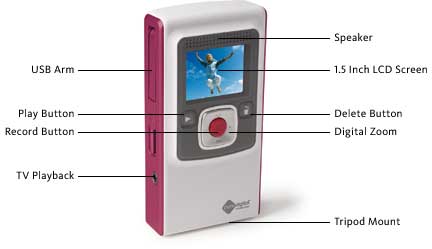
Flip Camera Demonstration
Video: How to Use a Flip Camera (Mohamed Esa)
Record an Interview with a Partner
- Turn on the flip camera
- Point the camera toward yourself and ask a question
- Turn the camera around and tape your partner answering the question. Repeat these steps until you are finished with Interview.
- Plug in the camera into your computer using the flip-out USB arm
- Follow instructions on the screen to upload your video onto your computer.
- Edit your video using the software provided by the Flip camera
- Upload your video onto YouTube or any other online video site.
Additional Resources and Works Cited
Activity Management
None